> For the complete documentation index, see [llms.txt](https://docs.mercuri.cx/llms.txt). Markdown versions of documentation pages are available by appending `.md` to page URLs; this page is available as [Markdown](https://docs.mercuri.cx/features/templates/whatsapp-templates/whatsapp-interactive-templates/use-cases-whatsapp-interactive-templates/carousel-cards.md).
# Carousel Cards
### **What Are Carousel Interactive Templates?**
Carousel Card templates on Mercuri allow brands to send **swipeable cards** inside a single WhatsApp message. Each card can include an **image or video**, a **short description**, and a **CTA button** with its own URL.
This format is ideal for showcasing multiple products, plans, or options in an engaging, visual layout—helping users explore and take action without leaving WhatsApp.
**Typical use cases include:**
* **Product listings** (e.g., variants, bestsellers, new arrivals)
* **Course bundles** (EdTech)
* **Plan comparison** (SaaS)
* **Travel packages**, **hotel rooms**, **property listings**
* **Event or session schedules**
***
#### **Use Case: EdTech – Promoting Online Courses**
Showcase multiple courses in a swipeable format so learners can quickly browse and click to enroll.
**Message Example:**
> Explore our most popular online courses and start learning today!
>
> **Card 1:** Python for Beginners – Start Learning →
>
> **Card 2:** Data Science Bootcamp – Join Bootcamp →
**Why it works:**\
Learners can visually browse different courses at once, increasing engagement and click‑through rates.
**Industry examples:**
* EdTech platforms
* E‑commerce product highlights
* Travel & Tours
* Real Estate listings
* Fitness & Wellness programs
***
#### **How to Create Carousel Templates on Mercuri**
{% embed url="" %}
1. **Log in to your Mercuri account**
2. Go to **Templates → WhatsApp** from the left panel
3. Click on the **Interactive Templates** tab
4. Select **Create Interactive Template**
5. Enter a **short, descriptive template name**
6. From the dropdown, choose **Carousel** as the interactive message type
7. Add the main **Message Body** – e.g., "Explore our top courses"
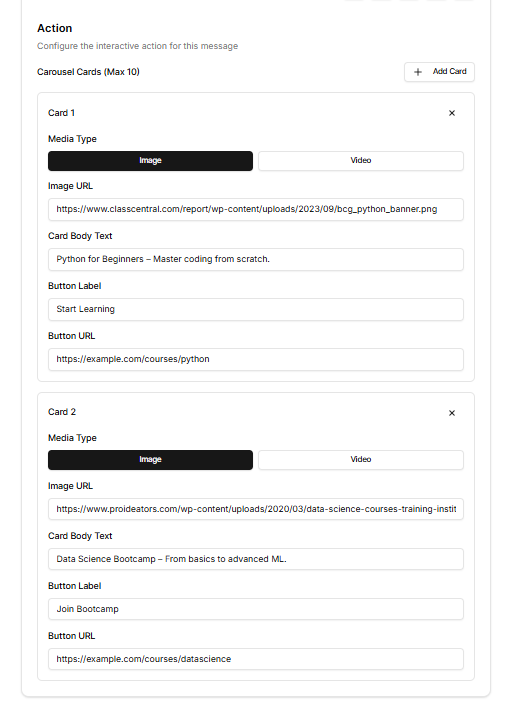
8. Scroll to the **Action** section to add cards
9. **Adding Carousel Cards**
* Click **+ Add Card**
* For **each card**, fill the fields:
**Card Fields:**
* **Media Type:** Image or Video
* **Image/Video URL:** Add your image/video link
* **Card Body Text:** Short description of the item
* **Button Label:** CTA (e.g., "Start Learning", "Shop Now", "Know More")
* **Button URL:** Link to the product, course, landing page, etc.
10. Once done, click on **Create.**
***
#### Sample Carousel Template (EdTech – Courses)
**Message Body:**\
Explore our most popular online courses and start learning today!
***
**Card 1**
**`Image URL:`**\
`https://example.com/images/python-course.png`
**`Card Body Text:`**`Python for Beginners – Master coding from scratch.`
**`Button Label:`**\
`Start Learning`
**`Button URL:`**\
`https://example.com/courses/python`
***
**Card 2**
**`Image URL:`**`https://example.com/images/datascience-course.png`
**`Card Body Text:`**`Data Science Bootcamp – From basics to advanced ML.`
**`Button Label:`**\
`Join Bootcamp`
**`Button URL:`**\
`https://example.com/courses/datascience`