> For the complete documentation index, see [llms.txt](https://docs.mercuri.cx/llms.txt). Markdown versions of documentation pages are available by appending `.md` to page URLs; this page is available as [Markdown](https://docs.mercuri.cx/features/templates/whatsapp-templates/whatsapp-interactive-templates/use-cases-whatsapp-interactive-templates/location-request-message.md).
# Location Request Message
### **What Are Location Request Message Templates?**
**Location Request Message** templates on Mercuri allow brands to send WhatsApp messages that prompt users to **share their live or current location with just a single tap.** This removes the need for typing addresses manually, reduces errors, and speeds up processes such as delivery, service visits, and appointment-based navigation.
Location request messages help businesses **collect precise GPS locations** directly from customers.
Typical use cases include:
* **Delivery address confirmation** (e.g., “Share your location for faster delivery”)
* **Service visit coordination** (e.g., AC repair, cleaning, electrician)
* **Appointment arrival guidance** (e.g., technician or field agent locating the customer easily)
* **Lead verification** (e.g., ensuring the customer is within a serviceable area)
***
#### **Use Case: Technician Visit – Locate Customer Easily**
Send a location request before a technician leaves for the appointment. This ensures accurate navigation and reduces delays caused by incorrect or incomplete addresses.
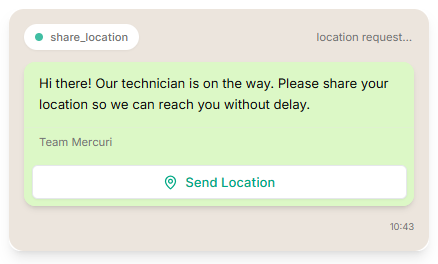
**Message Example:**
> Hi there! Our technician is on the way. Please share your location so we can reach you without delay.
>
> **Button:**
>
> Share Location
**Why it works:**
* Avoids address confusion
* Reduces time spent calling customers for directions
* Improves service experience
**Industry examples:**
* Home Services (AC repair, electrician, cleaning)
* Logistics & Delivery
* Healthcare (home sample collection)
* Real estate visits
***
#### How to Create a Location Request Message Template on Mercuri
{% embed url="" %}
1. Log in to your Mercuri account
2. Go to **Templates → WhatsApp** in the left-side panel
3. Click on the **Interactive Templates tab**
4. Select **Create Interactive Template**
5. The template creation page will open
6. Enter a short and descriptive template name.
7. From the dropdown, select the interactive message type as **Location Request Message.**
8. **Add Your Body Message Content:** Write a clear instruction asking the user to share their location.
**Example:**
> Hi there! Our technician is on the way. Please share your current location so we can reach you on time.
9. **(Optional) Add a Footer:** Use the footer to add extra context, such as support contact or terms.
10. **Location Sharing Behavior**
* **Location Request templates** on Mercuri automatically display a **“Share Location”** prompt to the user. You **do not need to manually add any buttons**.
* Once the user receives the message, WhatsApp will show the native location-sharing flow on mobile.
11. **Review & Submit for Approval:** Once done, review the template and click **Create** to submit it for WhatsApp approval.